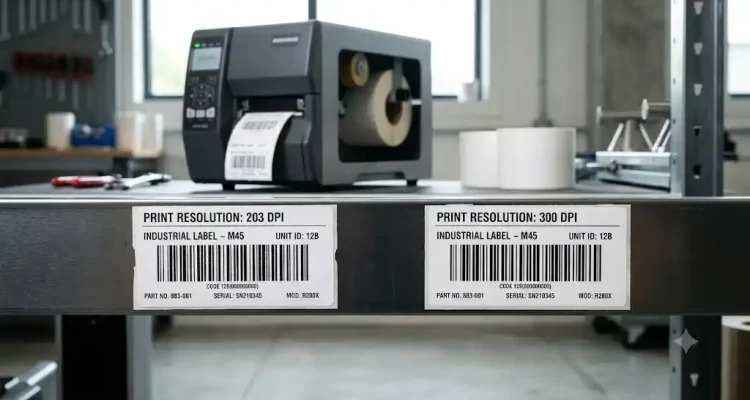
choosing a label printer, many businesses immediately compare printing speed, media size, connectivity, or device price. However, one specification is often overlooked even though it can significantly affect the final result: label printer resolution, commonly measured in dots per inch (DPI).
Product specifications usually offer options such as 203 DPI, 300 DPI, or even 600 DPI. At first glance, a higher number may seem like the obvious choice. If a 300 DPI printer produces more dots within the same area than a 203 DPI printer, does that mean every business should choose 300 DPI?
Not necessarily.
Higher resolution can produce sharper text, more detailed graphics, and cleaner barcode edges. However, it may also affect printer cost, printing speed, and the overall investment required. For large shipping labels, a 203 DPI printer may already provide more than enough quality. On the other hand, a small product label containing dense barcodes and tiny text may benefit from the additional detail provided by 300 DPI.
For this reason, understanding DPI is not simply about choosing the highest number. Businesses need to understand how print resolution affects barcode readability and how to select a printer that delivers the required quality without adding unnecessary costs.
What Does DPI Mean in a Label Printer?
DPI stands for dots per inch. It refers to the number of individual dots a printer can place within one inch of printed material. The higher the DPI value, the more dots the printer can place within the same printing area. A greater dot density allows the printer to create smoother lines, sharper text, and more detailed images.
As a simple comparison, a 203 DPI printer can produce approximately 203 dots across one inch, while a 300 DPI printer can produce approximately 300 dots. In another measurement commonly used in industrial printer specifications, 203 DPI is equivalent to approximately 8 dots per millimeter, while 300 DPI is approximately 12 dots per millimeter.
The difference may not always be obvious when printing large text or wide barcodes. However, when the label becomes smaller and more information must fit into the available space, the printer’s ability to reproduce fine details becomes increasingly important.
Imagine two printers producing the same barcode. On a large label, both 203 DPI and 300 DPI may generate a barcode that is easy to scan. However, when the barcode is reduced in size, its bars and spaces become narrower. A higher-resolution printer has more dots available to reproduce those small elements, potentially creating a more precise result.
Even so, DPI is not the only factor that determines label quality. Printhead condition, media type, ribbon quality, print darkness, and printing speed can also affect the final output.
When Is a 203 DPI Label Printer Enough?
For many business applications, a 203 DPI label printer is already more than capable. This resolution is widely used for shipping labels, carton labels, warehouse labels, inventory labels, and other operational applications where barcodes are relatively large.
For example, a logistics company may print shipping labels measuring 100 × 150 mm. These labels typically have enough space to display a tracking number, delivery address, service information, and a large barcode. In this situation, 203 DPI is generally sufficient to produce clear text and readable barcodes.
Manufacturers such as Zebra describe 203 DPI as suitable for many standard printing applications. Higher resolutions are generally more useful when a large amount of information must fit into a limited space or when the application requires smaller text and more detailed graphics.
A 203 DPI printer may also provide advantages in terms of productivity. Depending on the printer model, a 203 DPI configuration can offer faster maximum print speeds than a 300 DPI version. This difference can be important for businesses that print large quantities of labels every day.
If the main priorities are high throughput, fast printing, and relatively large label formats, 203 DPI can provide a practical balance between print quality, performance, and investment cost.
When Does a Business Need a 300 DPI Label Printer?
A 300 DPI printer becomes more relevant when the label size is limited but the amount of information that must be printed is relatively high. In these situations, businesses cannot simply increase the size of the barcode or text because the available label space is already restricted.
Examples include small product labels, electronic component labels, pharmaceutical labels, jewelry labels, laboratory sample labels, and asset labels with limited printing space. These labels may need to include a barcode, serial number, product code, date information, and other details within a compact area.
At 300 DPI, the printer has more dots available to reproduce barcode bars, spaces, and small text. This allows fine details to be printed more sharply and consistently.
Higher-resolution printers can also support smaller barcode elements, depending on the printer model and barcode requirements. This can be useful when a barcode must remain readable despite being printed within a very small area.
However, this does not mean every small barcode automatically requires 300 DPI. Barcode type, orientation, print media, scanner capability, and label design must also be considered. Testing under real operating conditions remains an important step before selecting a printer.
How DPI Affects Small Barcode Readability
A barcode works by using patterns of bars, spaces, or modules with specific dimensions. A scanner must be able to distinguish these elements clearly to read the encoded data correctly.
When a barcode is printed at a large size, its bars and spaces have enough width that a 203 DPI printer can usually reproduce the pattern accurately. However, as the barcode becomes smaller, each element must be created using fewer printer dots. If the barcode elements become too small relative to the printer’s resolution, the printed lines may lose precision.
This can create several problems:
- Barcode bars may appear to merge together.
- The spaces between bars may become too narrow.
- Barcode edges may appear uneven or jagged.
- Scanners may require more time to read the code.
- The barcode may fail to scan at certain angles or distances.
However, it is important to understand that a barcode that looks sharp is not always guaranteed to scan correctly. Likewise, a barcode that appears slightly imperfect may still be readable. Barcode performance depends not only on visual appearance but also on dimensional accuracy, print contrast, print quality, and compliance with the relevant barcode standard.
For this reason, businesses should not select printer resolution based only on text size or visual appearance. If barcodes play an important role in daily operations, the printed labels should be tested using the same scanners and conditions found in the actual workplace.
Higher Resolution Does Not Always Mean Better Results
There is a common assumption that a 300 DPI printer will always produce better results than a 203 DPI printer. Technically, higher resolution provides more detail. However, print quality can still be poor if other settings and components are not properly configured.
For example, excessive print darkness can cause barcode bars to spread or merge together. On the other hand, print darkness that is too low can produce faded labels that are difficult to scan. Excessive darkness may also increase printhead wear over time.
Printing speed is another important factor. In some applications, reducing the print speed can improve output quality because the printer has more time to apply heat and reproduce each element accurately. Similarly, using an unsuitable ribbon or low-quality label material may reduce print clarity even when the printer has a high resolution.
In other words, a poorly configured 300 DPI printer may not produce better barcode quality than a properly configured 203 DPI printer using the correct media.
How to Choose the Right Label Printer Resolution
Choosing the right label printer resolution should begin with the actual application rather than the assumption that a higher number is always better.
If a business prints shipping labels, carton labels, warehouse labels, or inventory labels with relatively large barcodes, 203 DPI is often sufficient. This resolution is also well suited to high-volume operations where printing speed is an important priority.
A 300 DPI printer should be considered when the business uses small labels containing dense information, compact barcodes, small text, or detailed graphics that require greater precision.
Before purchasing a printer, businesses should consider the following questions:
- What physical label size will be used?
- How small are the barcodes or text that need to be printed?
- How many labels will be printed each day?
- Is printing speed a major operational priority?
- Will the barcode be scanned from a specific distance or in challenging environmental conditions?
- Is the label design likely to become more complex in the future?
The answers to these questions can help businesses select an appropriate printer specification without paying for additional resolution that may never be fully used.
The Right Investment Is Not Always the Highest Resolution
When selecting a label printer, purchase price is important, but the decision should not be based only on the initial hardware cost. A printer with insufficient specifications may create barcode readability issues, slow down scanning processes, or require replacement as the business grows.
At the same time, purchasing a high-resolution printer for simple label applications may result in unnecessary spending. The business may pay for additional capabilities that provide little practical value.
A better approach is to evaluate the long-term value of the printer. If 203 DPI can consistently produce clear, readable, and reliable barcodes, it may be the more efficient choice. However, if print quality on small labels directly affects inventory accuracy, product traceability, regulatory compliance, or operational reliability, investing in 300 DPI may provide greater value.
The selected printer should support current requirements while also considering the future direction of the business. If labels are expected to become smaller or the printed information is likely to become more detailed, choosing a printer with suitable resolution options may be a strategic decision.
Conclusion
Understanding label printer resolution helps businesses select equipment based on real operational requirements rather than specification numbers alone. A 203 DPI printer is an effective choice for many standard applications, especially shipping, warehouse, and inventory labels with sufficiently large barcodes. A 300 DPI printer provides greater detail for small labels, dense barcodes, small text, and applications that require more precise printing.
However, DPI is not the only factor that determines print quality. Barcode design, label size, media type, printhead condition, print darkness, and printing speed can all have a significant effect on the final result.
Ultimately, the best investment is not always the printer with the highest resolution. The right investment is a printer that produces sharp, readable, consistent labels while meeting the business’s current needs and supporting future operational growth.